

Laplace-Dirichlet Rule-Based (LDRB) algorithm for assigning myocardial fiber orientations#
A software for assigning myocardial fiber orientations with Laplace-Dirichlet rule-based algorithms, based on FEniCSx. Two methods are implemented:
ldrb.dolfinx_ldrb: the method of Bayer et al. (2012), for left ventricular and biventricular geometries with a single baseBayer, J.D., Blake, R.C., Plank, G. and Trayanova, N.A., 2012. A novel rule-based algorithm for assigning myocardial fiber orientation to computational heart models. Annals of biomedical engineering, 40(10), pp.2243-2254. https://doi.org/10.1007/s10439-012-0593-5
ldrb.dolfinx_doste: the method of Doste et al. (2019), for biventricular geometries with outflow tracts and four valves (see Geometries with outflow tracts)Doste, R., Soto-Iglesias, D., Bernardino, G., Alcaine, A., Sebastian, R., Giffard-Roisin, S., Sermesant, M., Berruezo, A., Sanchez-Quintana, D. and Camara, O., 2019. A rule-based method to model myocardial fiber orientation in cardiac biventricular geometries with outflow tracts. International Journal for Numerical Methods in Biomedical Engineering, 35(4), e3185. https://doi.org/10.1002/cnm.3185
Getting started#
For example if you have a bi-ventricular geometry (e.g from cardiac-geometries), you can generate fibers as follows
import cardiac_geometries
import ldrb
import dolfinx

# Generate an idealized BiV geometry
geo = cardiac_geometries.mesh.biv_ellipsoid(outdir=geodir)
# Generate fibers with 60/-60 fibers angles on the endo- and epicardium
system = ldrb.dolfinx_ldrb(
    mesh=geo.mesh,
    ffun=geo.ffun,
    markers=geo.markers,
    alpha_endo_lv=60,
    alpha_epi_lv=-60,
    beta_endo_lv=0,
    beta_epi_lv=0,
    fiber_space="P_2",
)
# Visualize fibers in Paraview
with dolfinx.io.VTXWriter(
    geo.mesh.comm,
    outdir / f"microstructure-viz.bp",
    [system.f0, system.s0, system.n0],
    engine="BP4",
) as vtx:
    vtx.write(0.0)
If you now open the file microstructure-viz.bp in Paraview (using the ADIOS2VTXReader), select Glyph and choose f0 as orientation array you can see the fiber orientations similar to the following figure (here I have also added a Calculator to compute the fiber angle)

Note that you can achieve the the same results using the command line interface
ldrb mesh.xdmf --markers-file markers.json --fiber-space P_2 --alpha-endo-lv 60 --alpha-epi-lv -60 --beta-endo-lv 0 --beta-epi-lv 0
Note that if you don’t specify a different angle for the RV or Septum, then the same angle as the LV will be used.
The mesh file can be an XDMF file (.xdmf) or a file written by io4dolfinx with the adios2 (.bp) or h5py (.h5) backend, e.g. the geometry.bp written by cardiac-geometriesx. Use the latter for meshes of order higher than 2, which XDMF does not support
ldrb geometry.bp --markers-file markers.json
Higher order meshes#
Both methods work on meshes of any order. The Laplace problems are solved with Lagrange elements of the same degree as the geometry, so with a curved, higher order mesh the scalar fields, and hence the fibers, are as accurate as the geometry. The fibers can still be represented in any space with fiber_space, e.g. P_2 for a quadratic mesh.
Geometries with outflow tracts#
For biventricular geometries that include the outflow tracts and the four valves, such as the UK Biobank atlas, you can use the rule-based method of Doste et al. (2019). With ldrb.dolfinx_ldrb the four valves have to be marked together as the base, so there is one longitudinal direction from the apex to the base. ldrb.dolfinx_doste needs each valve as a separate marker. In each ventricle it blends the direction from the apex to the inflow valve (mitral or tricuspid) with the direction from the apex to the outflow valve (aortic or pulmonary), and it uses separate fiber angles in the LV, the RV and the outflow tracts
import cardiac_geometries
import ldrb

# Mean shape of the UK Biobank atlas at end diastole
geo = cardiac_geometries.mesh.ukb(outdir="ukb", case="ED", create_fibers=False)
m = {name: value[0] for name, value in geo.markers.items()}
system = ldrb.dolfinx_doste(
    mesh=geo.mesh,
    ffun=geo.ffun,
    markers={
        "lv": m["LV_ENDO"],
        "rv": m["RV_ENDO"],
        "epi": m["EPI"],
        "mv": m["MV"],  # mitral valve
        "av": m["AV"],  # aortic valve
        "tv": m["TV"],  # tricuspid valve
        "pv": m["PV"],  # pulmonary valve
    },
    fiber_space="P_2",
)
The blend uses a function \(w\) that is 1 at the apex and the inflow valve and 0 at the outflow valve. It is returned as system.w_lv and system.w_rv, together with the other Laplace solutions
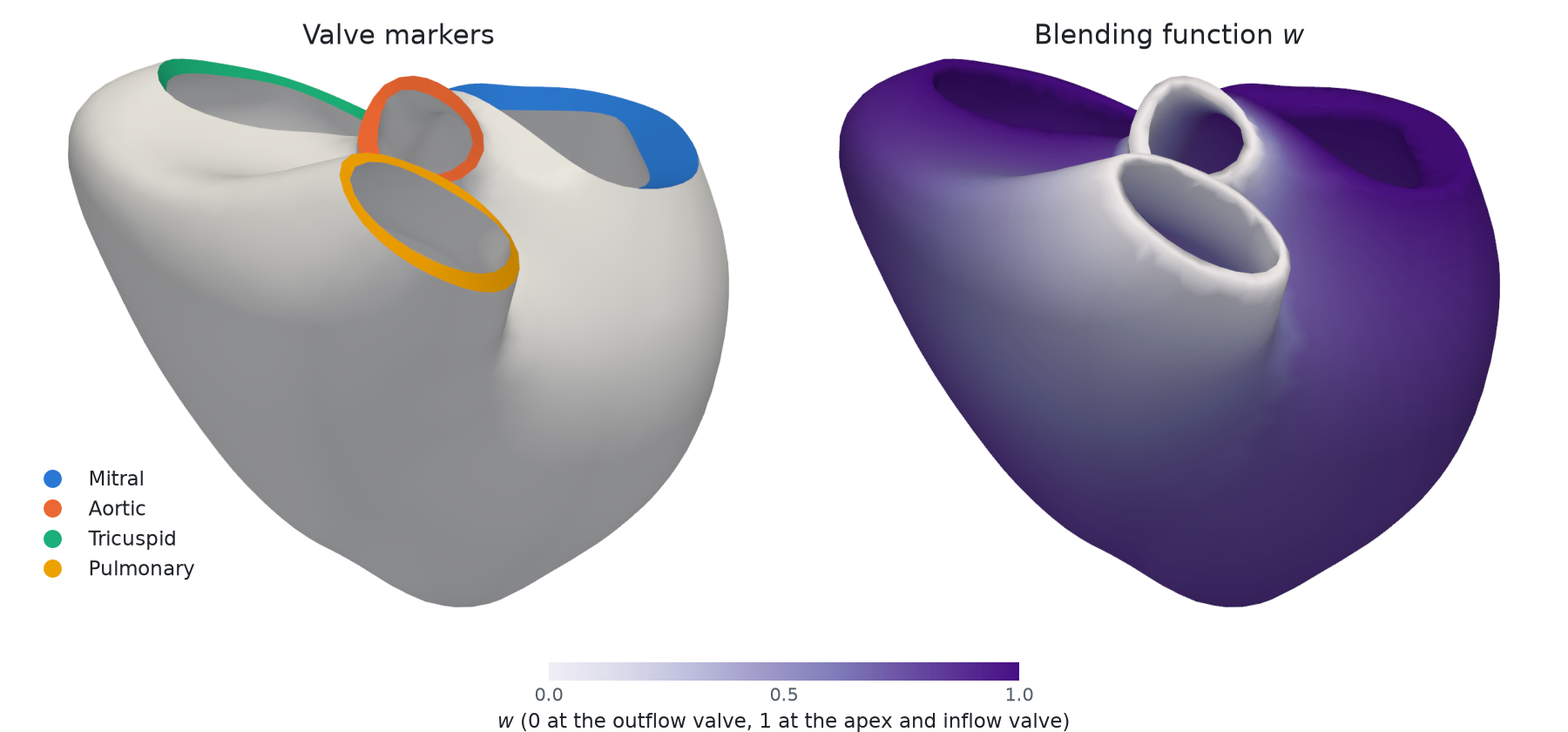
The default angles are the ones from the paper, written in the same convention as ldrb.dolfinx_ldrb (see ldrb.doste for the details). Each of them can be changed with keyword arguments such as alpha_endo_rv or beta_epi_ot
\(\alpha\) endo |
\(\alpha\) epi |
\(\beta\) endo |
\(\beta\) epi |
|
|---|---|---|---|---|
LV |
60 |
-60 |
20 |
-20 |
RV |
90 |
-25 |
0 |
-20 |
Outflow tracts |
90 |
0 |
0 |
0 |
The figure below compares the two methods on the UK Biobank mesh, with 60/-60 degrees for ldrb.dolfinx_ldrb. The colour shows how far each fiber is inclined from the short-axis plane (0 is circumferential, 90 is longitudinal). Doste et al. give near-circumferential fibers on the RV epicardium and in the outflow tracts, as observed in histology
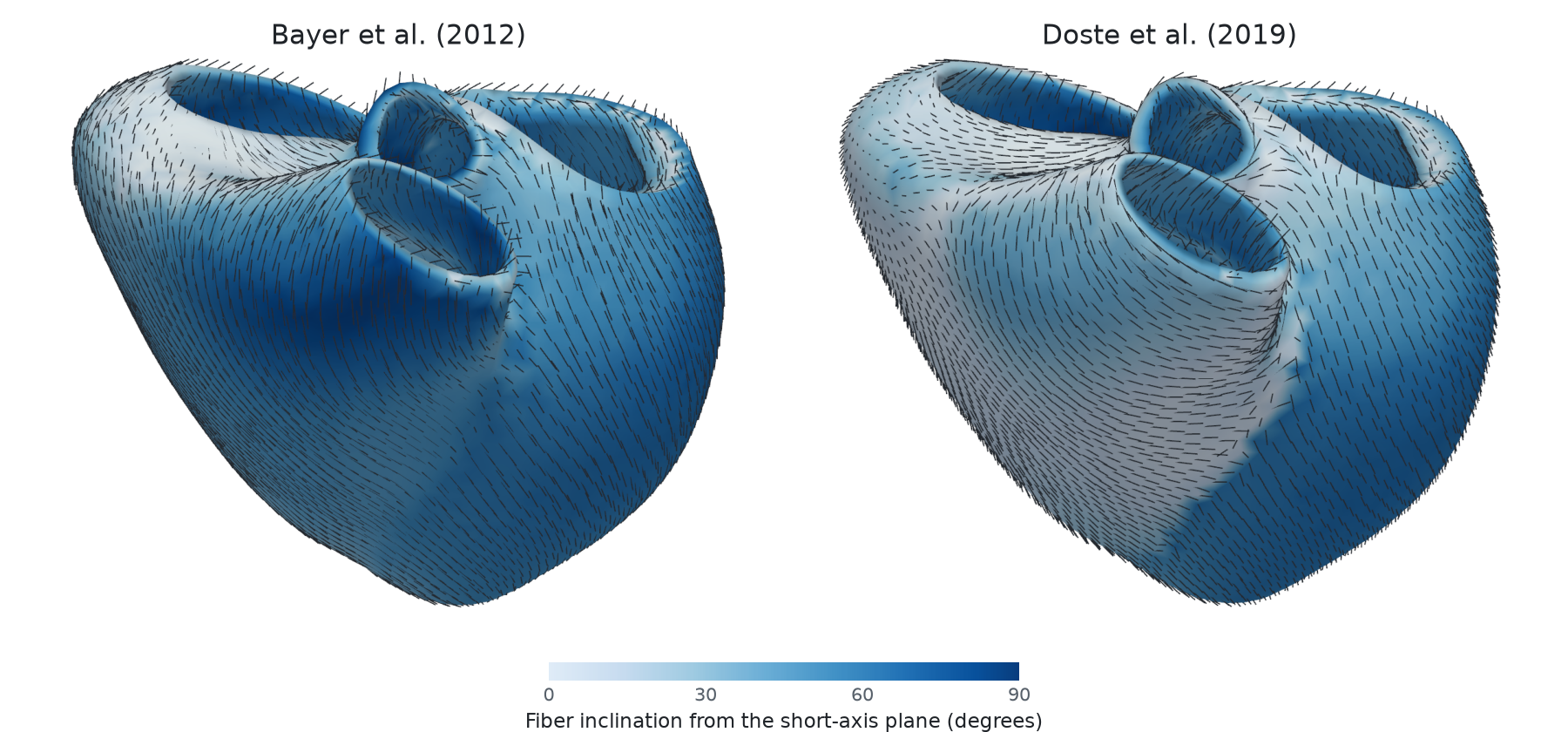
The apex of each ventricle is the point on its endocardium farthest from the inflow valve, unless you pass its coordinates with apex_lv and apex_rv. The septal interpolation of the paper is not implemented. See the demo for a full comparison of the two methods. Note that the command line interface currently only supports ldrb.dolfinx_ldrb.
Installation#
pip#
Note that you can install the package with pip, but then you need to install FEniCSx separatly, see download
python3 -m pip install fenicsx-ldrb
conda#
The package can also be installed with conda, i.e
conda install -c conda-forge fenicsx-ldrb
Docker#
To pull the latest docker image you can do
docker pull ghcr.io/finsberg/fenicsx-ldrb:main
or choose a specific version e.g
docker pull ghcr.io/finsberg/fenicsx-ldrb:v0.1.4
Note that you can also run the cli directly using docker e.g
docker run --rm -v $PWD:/home/shared -w /home/shared -it ghcr.io/finsberg/fenicsx-ldrb ldrb --help
Documentation#
License#
MIT
Contributors#
Henrik Finsberg (henriknf@simula.no)